Table of Contents
- What Are AI Agents
- How Do AI Agents Work
- AI Agents vs AI Automation: What’s the Difference
- Why AI Agents Matter for Business in 2026
- AI Agents for Business: Where They Create the Most Value
- 05 Practical AI Agent Examples
- AI Agent Workflow Automation: When Should You Use It
- How to Implement AI Agents in a Business
- AI Agent Development: What the Technology Stack Looks Like
- The Biggest Risks of AI Agents
- Best Practices for Safe AI Agent Implementation
- Common Mistakes Businesses Make With AI Agents
- What Is the Future of AI Agents
- Key Takeaways
- Conclusion
AI Agents in 2026: What They Are, How They Work, and How Businesses Can Use Them
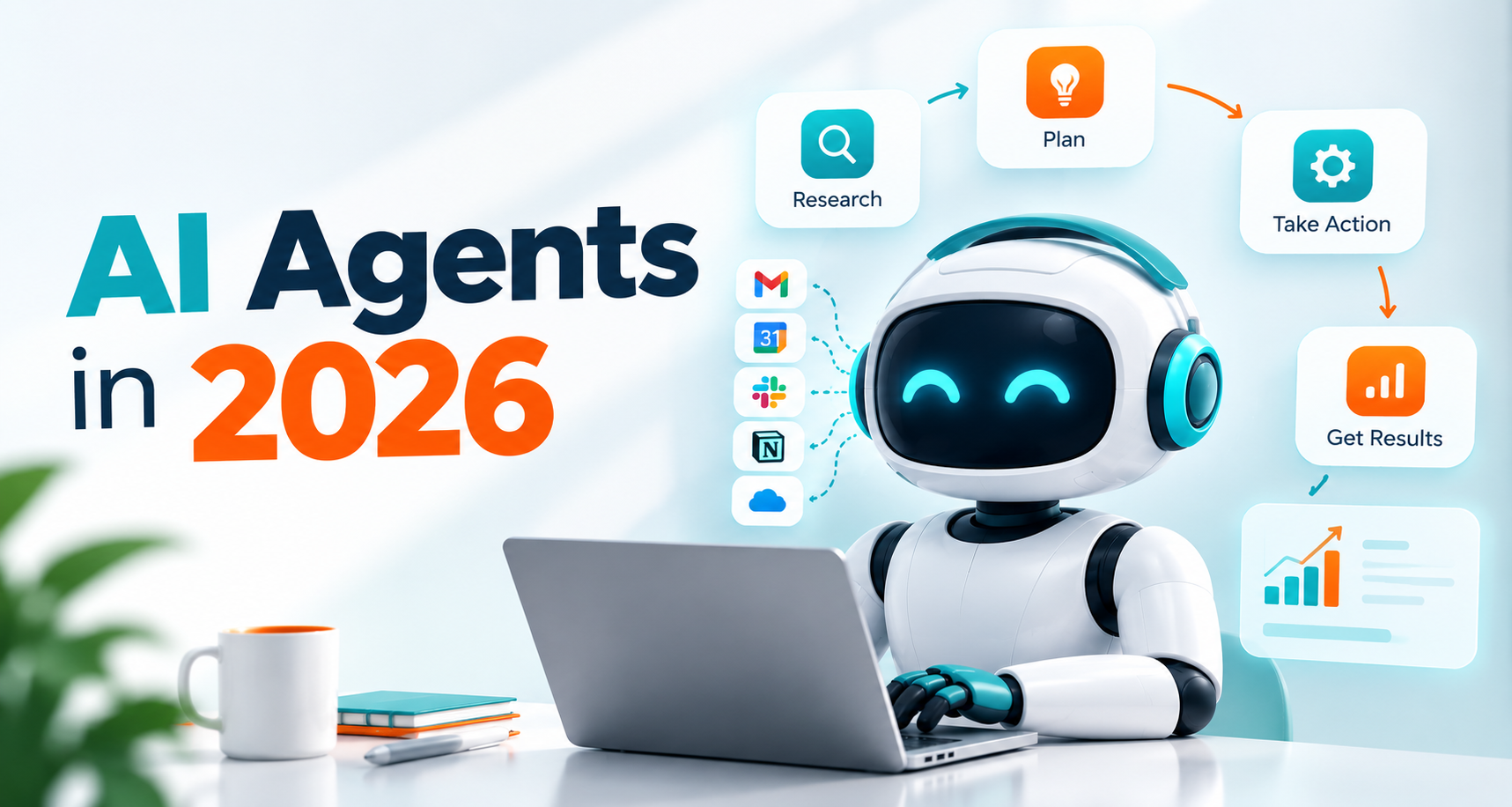
A chatbot can answer a customer’s question. An automation can move information from one application to another.
An AI agent can do something different: it can decide what needs to happen next, use the tools available to it, execute multiple steps, evaluate the result, and continue until the assigned goal is completed.
That difference is why businesses are paying much more attention to AI agents in 2026.
The technology has also moved beyond simple demonstrations. OpenAI now offers an Agents API with managed infrastructure for long-running agent sessions, tool use, subagents, files, code execution, and sandboxed environments. Google Cloud has built an enterprise platform around developing, deploying, governing, and scaling agents. Microsoft is positioning agents around the execution of business processes, while Anthropic has highlighted both the productivity potential and security challenges of increasingly autonomous systems.
The practical question for a business, however, isn’t simply:
“What can AI do?”
It’s:
“Which business process should AI be allowed to handle?”
This guide explains what AI agents are, how they work, how they differ from traditional automation, where they create the most value, and how businesses can approach implementation without giving an autonomous system unlimited access to everything.
What Are AI Agents
AI agents are software systems that use AI models to pursue a defined goal by reasoning about tasks, selecting tools, taking actions, and responding to the results of those actions.
Unlike a conventional chatbot, an agent isn’t limited to generating a response. It may retrieve information, call an API, update a CRM, analyze a document, browse a website, execute code, create an output, or hand a task to another specialized agent.
A useful way to think about an agent is:
Goal → Reason → Plan → Act → Observe → Adjust → Complete
For example, imagine a company receives a new lead through its website.
A basic chatbot might answer the visitor’s question.
A traditional automation might send the lead’s information to a CRM.
An agent could potentially:
- Read the inquiry.
- Identify the customer’s intent.
- Check the CRM for existing records.
- Research relevant company information.
- Score the lead against predefined criteria.
- Select an appropriate response.
- Draft a personalized follow-up.
- Update the CRM.
- Notify a sales representative.
- Schedule a meeting if the required conditions are met.
The important distinction is that the agent can make decisions between those steps instead of following only one rigid sequence.
How Do AI Agents Work
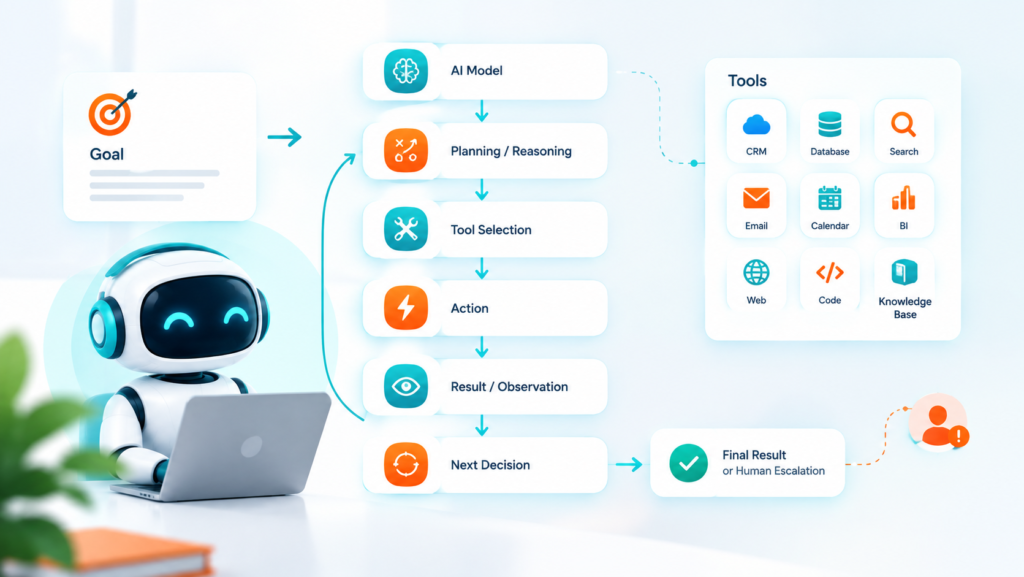
AI agents generally combine an AI model with instructions, context, tools, memory or state, and an execution environment.
The model provides reasoning and language capabilities. Tools allow the agent to interact with the outside world. The orchestration layer determines how the agent moves from one step to another.
A simplified architecture looks like this:
User or Business Goal
↓
AI Model
↓
Planning / Reasoning
↓
Tool Selection
↓
Action
↓
Result / Observation
↓
Next Decision
↓
Final Result or Human Escalation
1. The agent receives a goal
The goal might be:
“Qualify today’s inbound leads and identify which ones require immediate sales attention.”
The goal should be specific enough for the system to understand what success looks like.
2. The agent interprets the situation
The model examines available information and determines what needs to happen.
For example, it may recognize that lead qualification requires information from a form submission, CRM record, company website, and previous conversations.
3. The agent chooses tools
Tools might include:
- CRM APIs
- Databases
- Search systems
- Email platforms
- Calendar systems
- Business intelligence tools
- Web browsers
- Code execution environments
- Internal knowledge bases
4. The agent takes action
Instead of merely recommending an action, the system can perform an authorized action through the available tool.
5. The agent evaluates the result
Suppose an API returns incomplete information.
A well-designed agent can recognize that the result isn’t sufficient and choose another step.
This ability to observe and adapt is one of the defining characteristics of agentic systems.
6. The agent finishes or escalates
Not every task should be completed autonomously.
For sensitive actions—such as issuing refunds, changing financial information, deleting records, approving contracts, or sending high-risk communications—the system can request human approval.
This creates a safer model:
Autonomous for low-risk work. Human-controlled for high-risk decisions.
AI Agents vs AI Automation: What’s the Difference
AI automation usually follows a predefined workflow. AI agents are designed to handle more variable situations where the next step may depend on what they discover.
| Traditional Automation | AI Agent |
| Follows predefined rules | Can reason about a goal |
| Usually deterministic | Can adapt to changing situations |
| Fixed workflow | Dynamic workflow |
| Trigger → action | Goal → plan → actions |
| Limited decision-making | More flexible decision-making |
| Best for predictable processes | Best for variable processes |
| Often API-driven | Can combine APIs, tools, files and other interfaces |
Consider customer support.
A traditional workflow might be:
New ticket → classify → assign → send template
An agent might handle:
New ticket → understand issue → retrieve account information → search knowledge base → determine likely solution → respond → update ticket → escalate if confidence is low
Neither approach is universally better.
If a workflow is simple and predictable, conventional automation may be cheaper, faster, and easier to control.
If the workflow involves ambiguity, research, judgment, and multiple possible paths, an agent can be more appropriate.
Why AI Agents Matter for Business in 2026
Businesses are increasingly moving from AI that creates information toward AI that performs work.
Google Cloud describes this shift as the move toward an “agentic enterprise,” where agents can proactively handle complex business processes. Its 2026 platform includes development, deployment, governance, identity, runtime, and observability capabilities for enterprise agents.
OpenAI’s latest Agents API is another sign of the same direction. Its public beta provides infrastructure for long-running sessions, context management, tool use, subagents, files, code execution, and sandbox environments.
Microsoft similarly describes business agents as systems that can execute core business processes rather than simply provide insights.
The strategic change is important:
Generative AI asks, “What should I write?”
Agentic AI asks, “What needs to happen, and what can I do about it?”
That distinction opens the door to much larger workflow opportunities.
AI Agents for Business: Where They Create the Most Value
The best opportunities aren’t necessarily the most impressive demos.
They’re usually repetitive business processes that involve many steps, structured information, and frequent decisions.
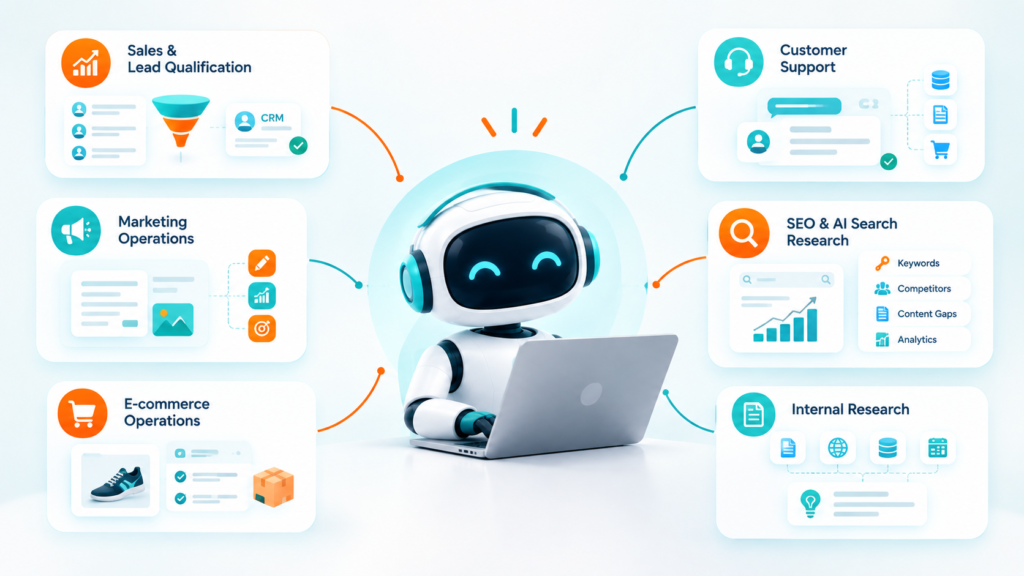
1. Sales and Lead Qualification
A sales agent can analyze inbound leads, identify intent, enrich company information, score prospects, update the CRM, and prepare personalized follow-ups.
For example:
Website inquiry → lead enrichment → qualification → CRM update → personalized email → sales notification
Human salespeople can then spend more time on conversations that actually require human judgment.
2. Customer Support
Support is one of the strongest AI agent use cases because many customer issues require information from multiple systems.
An agent may need to check:
- Customer history
- Order information
- Product documentation
- Subscription status
- Refund policies
- Previous support conversations
Instead of giving customers a generic answer, the system can potentially resolve the issue using live business context.
3. Marketing Operations
Marketing teams can use agents for research-heavy and repetitive workflows.
A marketing agent could:
- Research a topic.
- Analyze competitors.
- Identify content gaps.
- Prepare a content brief.
- Create draft material.
- Suggest internal links.
- Generate campaign variations.
- Prepare performance reports.
Human review should remain part of the process where brand, legal, factual, or strategic judgment matters.
4. SEO and AI Search Research
SEO teams can use agents to monitor search results, analyze competitors, organize keyword opportunities, identify content gaps, and prepare recommendations.
An SEO agent could combine:
Search data + website data + competitor information + content inventory + analytics
to produce a prioritized action list.
This is especially relevant as Google expands AI-powered search experiences.
Google’s current guidance says AI Overviews and AI Mode continue to rely on foundational Search systems. It also emphasizes helpful, unique, people-first content rather than special AI-search tricks.
5. E-commerce Operations
E-commerce companies can apply agents to:
- Product information management
- Customer questions
- Order-status requests
- Product recommendations
- Inventory analysis
- Review analysis
- Supplier research
- Returns triage
- Sales reporting
A product-support agent, for example, could compare customer requirements against structured product information and recommend suitable products without forcing a human employee to answer every basic question.
6. Internal Research
Research tasks are often fragmented across documents, websites, databases, spreadsheets, and internal systems.
An agent can gather information from multiple sources, organize findings, compare options, and prepare a structured report.
The human still makes the final strategic decision.
05 Practical AI Agent Examples
Here are practical examples of how agentic workflows can look inside different businesses.
Example 1: AI Lead Agent
Trigger: New website lead
Actions:
- Read inquiry
- Identify intent
- Enrich lead
- Check CRM
- Score opportunity
- Draft follow-up
- Update CRM
- Notify salesperson
Example 2: AI Support Agent
Trigger: Customer support request
Actions:
- Identify customer
- Read previous conversations
- Search knowledge base
- Check account status
- Generate response
- Resolve or escalate
Example 3: AI SEO Agent
Trigger: Weekly SEO analysis
Actions:
- Analyze Search Console data
- Identify declining pages
- Compare competitors
- Find content gaps
- Prioritize opportunities
- Generate recommendations
Example 4: AI Sales Research Agent
Trigger: New target account
Actions:
- Research company
- Identify decision-makers
- Analyze business model
- Find relevant pain points
- Prepare sales briefing
Example 5: AI Reporting Agent
Trigger: End of month
Actions:
- Collect marketing data
- Compare previous periods
- Identify anomalies
- Summarize performance
- Explain major changes
- Prepare management report
The value isn’t in making the agent “look intelligent.”
The value is reducing the amount of manual work required to reach a useful business outcome.
AI Agent Workflow Automation: When Should You Use It
AI agent workflow automation makes the most sense when a process contains both structured steps and variable decisions.
Use conventional automation when:
- The process rarely changes.
- Rules are straightforward.
- Inputs and outputs are predictable.
- There is little ambiguity.
Consider an agent when:
- Inputs vary significantly.
- The system needs to interpret natural language.
- Multiple tools are required.
- The workflow requires research.
- The next action depends on previous results.
- Exceptions occur frequently.
- Human employees spend substantial time making repetitive decisions.
A useful test is:
If the workflow can be expressed entirely as “when X happens, always do Y,” traditional automation may be enough.
If the workflow sounds more like:
“Understand the situation, investigate what happened, decide what information is missing, take the appropriate action, and escalate unusual cases,”
an agent may be a better fit.
How to Implement AI Agents in a Business
Successful AI agent implementation starts with the business process—not the AI model.
Step 1: Choose one workflow
Don’t start by trying to automate the entire company.
Choose one process with:
- High repetition
- Clear business value
- Measurable outcomes
- Accessible data
- Manageable risk
Step 2: Define the goal
Bad goal:
“Build an AI agent for sales.”
Better goal:
“Reduce the manual time required to qualify inbound leads while maintaining human approval for high-value opportunities.”
The second goal can actually be measured.
Step 3: Map the existing workflow
Document:
Trigger → Input → Decision → Action → Result → Exception
This exposes where an agent is actually needed.
Step 4: Identify the tools
Determine which systems the agent needs to access.
For example:
- CRM
- Calendar
- Website
- Database
- Analytics
- Internal documents
Only provide the permissions required for the job.
Step 5: Add human approval
Don’t give an early-stage agent unrestricted authority.
Create approval checkpoints for sensitive actions.
Step 6: Test with real scenarios
A production-ready agent needs more than a successful demo.
Test:
- Normal cases
- Missing information
- Contradictory information
- Unexpected inputs
- Tool failures
- Security attacks
- Escalation scenarios
Google’s production-agent guidance emphasizes testing, memory, orchestration, security, and lifecycle management because agents behave differently from traditional deterministic software.
Step 7: Measure business outcomes
Track metrics such as:
- Processing time
- Cost per task
- Resolution rate
- Human intervention rate
- Error rate
- Conversion rate
- Customer satisfaction
- Revenue influenced
Don’t measure success simply by asking whether the AI produced an impressive response.
AI Agent Development: What the Technology Stack Looks Like
Modern AI agent development typically combines several layers.
AI model
The model provides reasoning, language understanding, and generation.
Agent orchestration
The orchestration layer manages the agent’s loop, context, tools, state, and sometimes multiple specialized agents.
Tools and APIs
Tools give the agent access to real business systems.
Knowledge layer
The agent may need access to company documents, databases, product catalogs, policies, or other sources.
Execution environment
Some agents need controlled environments where they can execute code, manipulate files, or perform computer-based tasks.
Security and governance
This layer controls:
- Identity
- Permissions
- Data access
- Tool access
- Logging
- Monitoring
- Human approval
- Policy enforcement
Google’s current Agent Platform documentation reflects this full lifecycle approach, including agent identity, runtime, governance, security, observability, and development tooling.
The Biggest Risks of AI Agents
More autonomy creates more responsibility.
An AI agent can make mistakes faster than a human if it has broad access and poor controls.
1. Incorrect decisions
An agent may misunderstand an instruction or act on incomplete information.
2. Prompt injection
External content can sometimes contain instructions designed to manipulate an agent into taking unintended actions.
Anthropic specifically identifies prompt injection as an important security challenge for increasingly autonomous agents.
3. Excessive permissions
An agent should not have access to every system simply because access is technically possible.
4. Data leakage
Agents may process sensitive customer, financial, operational, or internal information.
5. Cost overruns
Long-running agents can consume significant model and tool resources if poorly designed.
6. Lack of observability
If you can’t determine why an agent made a decision, debugging becomes difficult.
7. Automation without accountability
A business still needs a responsible person or team for important decisions.
The answer isn’t to avoid agents.
It’s to design them with bounded autonomy.
Best Practices for Safe AI Agent Implementation
A practical business framework is:
Start narrow
Give the agent one clearly defined job.
Use least-privilege access
Only provide the tools and permissions required for that job.
Separate decisions from execution
For high-risk tasks, let the agent recommend an action but require human approval before execution.
Log important actions
Keep records of tool calls, decisions, failures, and approvals.
Build escalation paths
The agent should know when it cannot safely continue.
Evaluate continuously
Test performance against real examples rather than relying on a single demonstration.
Design for failure
Assume APIs will fail, information will be incomplete, and the model will sometimes be wrong.
This is one of the biggest differences between an AI demo and a production business system.
Common Mistakes Businesses Make With AI Agents
Mistake 1: Starting with the technology
A company chooses a model first and then searches for something to automate.
Start with the business problem instead.
Mistake 2: Automating a broken process
If the existing workflow is inefficient, adding an agent can simply make the inefficiency faster.
Fix the process first.
Mistake 3: Giving too much autonomy
More autonomy doesn’t automatically mean more value.
A controlled agent with the right permissions is often more useful than an unrestricted one.
Mistake 4: Ignoring exceptions
Real businesses aren’t perfectly predictable.
Design for unusual cases from the beginning.
Mistake 5: Measuring output instead of outcomes
A beautiful AI-generated report doesn’t matter if nobody uses it.
Measure time saved, revenue influenced, errors reduced, or customer experience improved.
What Is the Future of AI Agents
The next phase of AI agents is likely to involve more capable individual agents, specialized multi-agent systems, richer tool use, and deeper integration with business software.
The direction is already visible.
OpenAI’s latest agent infrastructure supports subagents and long-running work. Google is building platforms for enterprise agent development, deployment, governance, and optimization. Microsoft is integrating agents into business workflows. Anthropic is focusing heavily on making autonomous systems trustworthy.
Another important development is the rise of agent-to-agent interaction.
Instead of one general-purpose agent performing every task, businesses can create specialized agents:
Research Agent → Sales Agent → CRM Agent → Support Agent → Reporting Agent
A coordinating system can decide which specialist should handle each part.
That could make business automation more modular.
But it also makes governance more important.
As more agents interact with one another and external systems, businesses will need stronger identity, permission management, monitoring, testing, and approval systems.
The future isn’t simply about making agents more autonomous.
It’s about making them reliably autonomous within clearly defined boundaries.
Key Takeaways
- AI agents can pursue goals, use tools, take actions, and adapt based on results.
- They are different from traditional automation because they can handle more variable workflows.
- The strongest business opportunities are usually repetitive, multi-step processes involving research or decision-making.
- Sales, support, marketing, SEO, e-commerce, research, and reporting are strong starting points.
- AI agent workflow automation should begin with a clearly defined business problem.
- Traditional automation is still better for simple, predictable processes.
- Production agents require testing, monitoring, security, permissions, and escalation paths.
- Human approval remains important for high-risk decisions.
- Current platforms from OpenAI, Google, Microsoft, and Anthropic show that the industry is moving toward more capable and more autonomous business agents.
- The goal shouldn’t be maximum autonomy. It should be useful autonomy with measurable business value and controlled risk.
Conclusion
AI agents are becoming less about generating answers and more about completing work.
That shift changes how businesses should think about automation.
The question isn’t whether a company should replace every workflow with an agent. It shouldn’t.
The better question is:
Which process currently consumes valuable human time but doesn’t require humans to perform every step manually?
That might be qualifying leads, researching prospects, handling repetitive support requests, analyzing SEO data, preparing reports, monitoring business information, or coordinating information across multiple systems.
Start with one workflow.
Define the outcome.
Give the agent only the tools it needs.
Add human approval where risk requires it.
Measure the result.
Then expand.
That’s a much more practical path toward AI-powered business operations than trying to build a completely autonomous company overnight.
Ready to Find the Right AI Agent Opportunity for Your Business?
AI agents can create significant value—but only when they’re connected to the right process, data, tools, and business objective.
If you’re unsure where AI agent automation fits into your operations, Book a free business growth consultation with Minchow Coders.
We’ll help you identify practical opportunities where AI agents and automation can reduce repetitive work, improve operational efficiency, and support business growth.
More insights
GPT-6 Astra AGI: Is This OpenAI’s AGI Era Moment
OpenAI did something no major AI lab had done before in such blunt terms: it stood in front of…
The Lean Startup Summary: The Complete Breakdown Every Founder Needs
The Lean Startup by Eric Ries teaches entrepreneurs to test business ideas with a Minimum Viable Product instead of writing a long business plan. The lean startup methodology uses a Build-Measure-Learn loop to validate what customers actually want, so founders…
n8n AI Automation 2026: What the Latest Update Means for Business Automation
Somewhere in your business right now, someone is copying data from one spreadsheet to another by hand. Or forwarding…
Want results like this for your business?
Book a free consultation and we will show you where to start.
Talk to us on WhatsApp