n8n AI Automation 2026: What the Latest Update Means for Business Automation
Somewhere in your business right now, someone is copying data from one spreadsheet to another by hand. Or forwarding leads from a form to a CRM one email at a time. Or manually checking if an invoice got paid before following up. These are the small, repetitive tasks that eat hours every week without ever showing up on a to-do list as “important.”
n8n has been a popular way to fix that for years, but the platform quietly went through a major shift in 2026. AI stopped being a bolt-on feature and became part of the core workflow architecture. If you looked at n8n a year ago and decided AI automation wasn’t quite ready for your business, it’s worth another look. The pace of change is easy to verify yourself too, since n8n’s official documentation and changelog gets updated with nearly every release.
This guide covers exactly what changed in n8n AI automation for 2026, how it stacks up against alternatives like Zapier, and the question most guides skip entirely: should you set this up yourself, or bring in someone who already knows where the mistakes happen?
What’s New in n8n AI Automation for 2026
The biggest change in n8n AI automation for 2026 is architectural. AI tools, memory, and language model calls are now available as standard node types inside any workflow, rather than requiring a separate sub-workflow pattern. This is paired with a redesigned Canvas interface, deeper Model Context Protocol support, and more reliable error handling.
In previous versions, building an AI-powered workflow meant working around the platform rather than with it. AI nodes lived outside the standard node library, and connecting them to the rest of a workflow required specific patterns that added complexity for anyone without a technical background.
That gap has closed. AI-first workflow architecture is now the default, not an advanced feature you have to unlock. A few of the most significant updates include:
- A redesigned Canvas UI, shipped in early 2026, replacing the older flat left-to-right builder with a structure that’s easier to follow on complex workflows
- Native support for AI agents with persistent memory across executions, instead of every run starting from a blank slate
- Deeper Model Context Protocol integration, including migration of the instance MCP server to the current MCP SDK
- An AI assistant capable of organizing sprawling workflows into logical node groups automatically
- Per-node retry configuration with exponential backoff, plus a dedicated error branch for routing failed steps
For a business owner, the practical effect is this: workflows that used to need a developer to build and maintain now require far less specialized knowledge to set up correctly.
How Does n8n’s AI Agent Node Work Now
The n8n AI agent node lets a workflow call a language model, retain context between steps through built-in memory, and decide which tool or action to trigger next based on that context. In 2026, this behaves as a standard workflow component instead of a separate, harder-to-manage sub-process.
Think of it as the difference between a assistant who forgets everything the moment you turn away, and one who remembers what you asked five minutes ago. Earlier versions of n8n’s AI agent behaved more like the first kind. Memory was stateless by default, which meant an agent handling a customer inquiry couldn’t reliably reference anything from earlier in the same conversation without extra configuration.
The updated agent memory model fixes that. A workflow can now hold context across multiple steps in a single execution, which matters for anything resembling a real conversation, like a support workflow that needs to remember what a customer already explained, or a lead-qualification flow that builds on earlier answers instead of asking the same question twice.
This is also where the earlier reliability problems get addressed. Ambiguous tool calls used to be a common cause of agents looping indefinitely. The updated error handling, with defined retry limits and a clear failure path, gives these workflows a way to fail safely instead of getting stuck.
What Is MCP in n8n
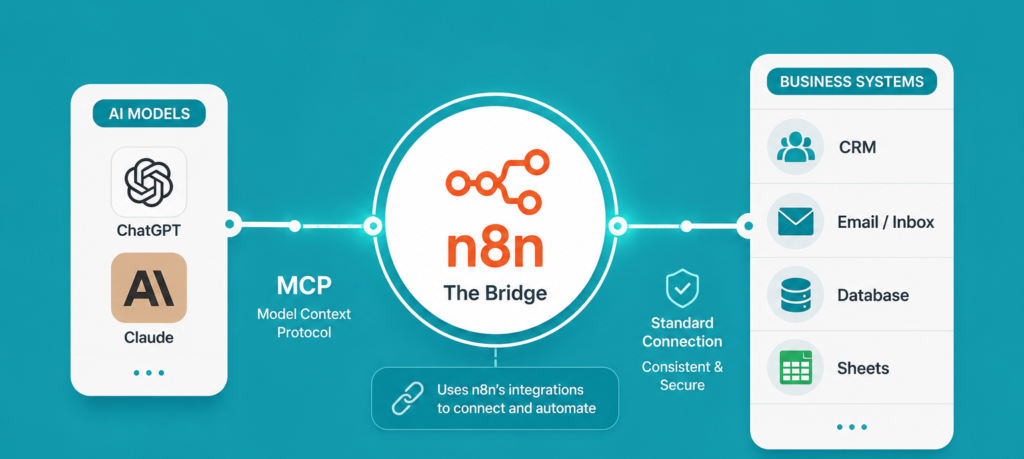
MCP, or Model Context Protocol, is a standard that allows AI models to connect with external tools, data sources, and applications in a consistent way. Inside n8n, MCP integration means workflows can act as a bridge between an AI model like Claude or ChatGPT and the rest of your business systems, without custom-building that connection from scratch every time.
For a non-technical reader, the simplest way to think about MCP is as a shared language. Instead of every AI tool needing a custom-built connector for every app it talks to, MCP gives them a common way to communicate. n8n’s role is to sit in the middle, using its wide library of app integrations as the practical bridge between an AI model and things like your CRM, your inbox, or your internal database.
The 2026 update moved n8n’s MCP server onto the current MCP SDK and added support for the newer discovery handshake standard. In practical terms, this means n8n plays more reliably with modern AI tools, which matters if your business automation plans include connecting an AI assistant to systems you already use daily. If you want the technical details behind how this standard works, the Model Context Protocol official specification documents the full handshake and discovery process.
n8n vs Zapier AI Automation: Which Is Better
n8n AI automation offers more flexibility, self-hosting options, and lower long-term cost at scale, while Zapier remains easier for simple, one-off automations with minimal setup. The right choice depends on how complex your workflows are and whether you have the internal capacity to manage the platform yourself.
| Factor | n8n | Zapier |
| AI-first architecture | Native AI agent nodes with memory | AI features added as separate steps |
| Self-hosting | Available, gives full data control | Not available, cloud-only |
| Complexity handling | Strong for multi-step, branching logic | Better suited to simple, linear flows |
| Setup difficulty | Steeper learning curve | Easier for beginners |
| Cost at scale | Generally lower for high-volume workflows | Costs rise quickly with execution volume |
| Custom code support | JavaScript and Python when needed | Limited custom code options |
Neither tool is universally “better.” A small business running a handful of simple automations, like forwarding form submissions to email, may find Zapier’s simplicity worth the trade-off. A business running dozens of interconnected workflows involving AI decision-making, data transformation, and multiple systems will usually get more value from n8n workflow automation for business, especially now that AI is built into the core rather than bolted on.
Self-Host n8n or Use a Managed Service
Self-hosting n8n gives you full control over data and lower software costs, but it requires someone to own ongoing maintenance, updates, and troubleshooting. A managed service or hiring an automation expert removes that operational burden, which is usually the better choice for businesses without dedicated technical staff.
This is the decision most guides gloss over, and it’s the one that actually determines whether your automation project succeeds long term. It also helps to understand how often things change: n8n’s GitHub repository shows new releases going out on an almost daily basis, which is worth knowing before you commit to owning updates yourself.
Self-hosting makes sense when:
- You have strict data privacy or compliance requirements that require full control over where data lives
- Someone on your team has the technical background to handle server maintenance and platform updates
- Your automation volume is high enough that self-hosting meaningfully reduces cost
- You’re comfortable troubleshooting issues without a support team on standby
A managed setup or expert help makes sense when:
- Your team doesn’t have spare technical bandwidth to own another system
- You want automations live quickly, without a setup and learning curve first
- You’d rather pay for reliability than spend internal hours maintaining infrastructure
- Your workflows touch customer-facing systems where downtime has a real cost
Many businesses land on a middle path: they hire an n8n automation expert to handle the initial build and edge-case testing, then either keep that support ongoing or bring maintenance in-house once the workflows are stable.
There’s a well-known pattern among businesses that try to self-host purely to save on subscription fees: the platform itself is free or low-cost, but someone still has to own it. Teams without that ownership in place often end up spending unplanned hours firefighting broken workflows after routine updates, which quietly cancels out the savings they were chasing in the first place.
How Much Does It Cost to Run n8n for a Business
Costs vary depending on whether you self-host or use a managed setup. Self-hosting involves server and infrastructure costs plus the value of the time someone spends maintaining it, while a managed cloud plan or working with an automation expert shifts that cost into a predictable monthly fee. There isn’t a single number that applies to every business, since it depends on workflow volume and complexity.
Rather than quoting a specific figure that may already be outdated by the time you read this, it’s more useful to understand the cost categories involved:
- Infrastructure costs for self-hosting, covering server hosting and any related services
- Time costs, which are easy to underestimate, covering setup, monitoring, and fixing workflows after platform updates
- Managed plan costs, which bundle hosting, updates, and support into a predictable subscription
- Expert setup and management costs, if you outsource the build and ongoing maintenance rather than handling it internally
For an accurate current number, checking n8n’s official pricing page directly is more reliable than relying on older articles, since cloud pricing tiers do get revised.
How n8n Good for Small Business Automation
n8n is well suited to small business automation, particularly for businesses with repetitive, multi-step processes involving several apps or an AI decision point. The 2026 AI-first update makes it more accessible to non-technical teams than earlier versions, though the platform still has a learning curve compared to simpler tools.
Where n8n tends to deliver the most value for a small business is in the repeat work that sits close to revenue: routing and qualifying new leads, drafting first responses to common customer questions, syncing information between a CRM and other business tools, and generating recurring reports without someone compiling them by hand each week.
The trade-off is real, though. n8n workflow automation for business gives you more power than simpler tools, but that power comes with more decisions to make during setup. A workflow that mishandles an edge case, like a malformed form submission or an API that briefly goes down, can cause quiet failures if error handling wasn’t configured carefully. This is exactly the kind of detail that’s easy to miss without prior experience building these systems.
Common Mistakes Businesses Make With n8n Automation
- Skipping error handling entirely. A workflow with no retry logic or failure path can fail silently, and nobody notices until a customer complains.
- Automating a broken process. Automation makes a good process faster and a bad process fail faster. Fix the process first.
- Self-hosting without a clear owner. Free software still needs someone responsible for keeping it running.
- Treating AI agent nodes like a “set and forget” feature. Agent behavior should be tested against edge cases, not just the happy path, before it touches real customers.
- Not documenting workflows. A workflow that only one person understands becomes a liability the day that person is unavailable.
Best Practices for Getting Started
- Start with one high-friction manual process, not your entire operation, and prove the automation works before expanding.
- Build in error branches from day one, rather than adding them after something breaks in production.
- Keep humans in the loop at decision points that involve money, legal language, or anything public-facing.
- Test AI agent workflows with unusual or messy input, not just clean examples, before rolling them out.
- Review workflows on a schedule, since n8n ships frequent updates and behavior can shift over time.
Expert Tip
The teams that get the most value from n8n AI automation aren’t the ones with the most complex workflows. They’re the ones who automate a small number of high-value processes well, monitor them consistently, and expand gradually. Businesses that try to automate everything at once, without a clear owner for the system, are the ones most likely to end up with workflows nobody trusts to run unsupervised.
Key Takeaways
- n8n’s 2026 update makes AI a core part of the workflow architecture instead of a separate add-on, with native agent memory and a redesigned Canvas UI.
- MCP integration allows n8n to connect AI models like Claude or ChatGPT to your existing business systems through a shared standard rather than custom connectors.
- n8n generally offers more flexibility and better cost efficiency than Zapier at scale, while Zapier remains simpler for basic, low-volume automations.
- Self-hosting n8n requires a clear technical owner; without one, the “free” platform often costs more in lost time than a managed alternative would.
- Small businesses benefit most from automating a small number of high-value, repeat processes rather than trying to automate everything at once.
Conclusion
The 2026 update to n8n closes a gap that held back a lot of businesses from taking AI automation seriously. AI agents that remember context, tighter error handling, and native MCP support mean the platform can now do reliably what used to require workarounds and technical patience.
The remaining question isn’t whether n8n AI automation is capable enough for your business. For most repetitive, multi-step processes, it is. The real question is whether you have the internal capacity to own the setup, maintenance, and troubleshooting, or whether that time is better spent running your business while someone else handles the automation layer.
If you’re leaning toward getting expert help rather than learning this platform from scratch, working with an experienced n8n automation agency can get reliable workflows live in a fraction of the time a self-taught setup usually takes.
Not sure whether your business needs custom n8n workflows, or whether your current manual processes are even worth automating? Book a free business growth consultation with Minchow Coders, and we’ll map out exactly where automation would save you the most time.
More insights
AI Agents in 2026: What They Are, How They Work, and How Businesses Can Use Them
A chatbot can answer a customer’s question. An automation can move information from one application to another. An AI…
GPT-6 Astra AGI: Is This OpenAI’s AGI Era Moment
OpenAI did something no major AI lab had done before in such blunt terms: it stood in front of…
The Lean Startup Summary: The Complete Breakdown Every Founder Needs
The Lean Startup by Eric Ries teaches entrepreneurs to test business ideas with a Minimum Viable Product instead of writing a long business plan. The lean startup methodology uses a Build-Measure-Learn loop to validate what customers actually want, so founders…
Want results like this for your business?
Book a free consultation and we will show you where to start.
Talk to us on WhatsApp