Table of Contents
- What Changed in Meta Ads Attribution in 2026
- Why Did My Meta Ads Conversions Drop After This Update
- Click-Through vs Engage-Through Attribution: A Side-by-Side Comparison
- How to Read Your Meta Ads Attribution Report Correctly Now
- What This Means for Advantage+ Campaigns
- Common Mistakes Businesses Make After This Change
- Best Practices Going Forward in Meta Ads
- Conclusion
Why Did Meta Ads Conversions Drop? The 2026 Attribution Change Explained
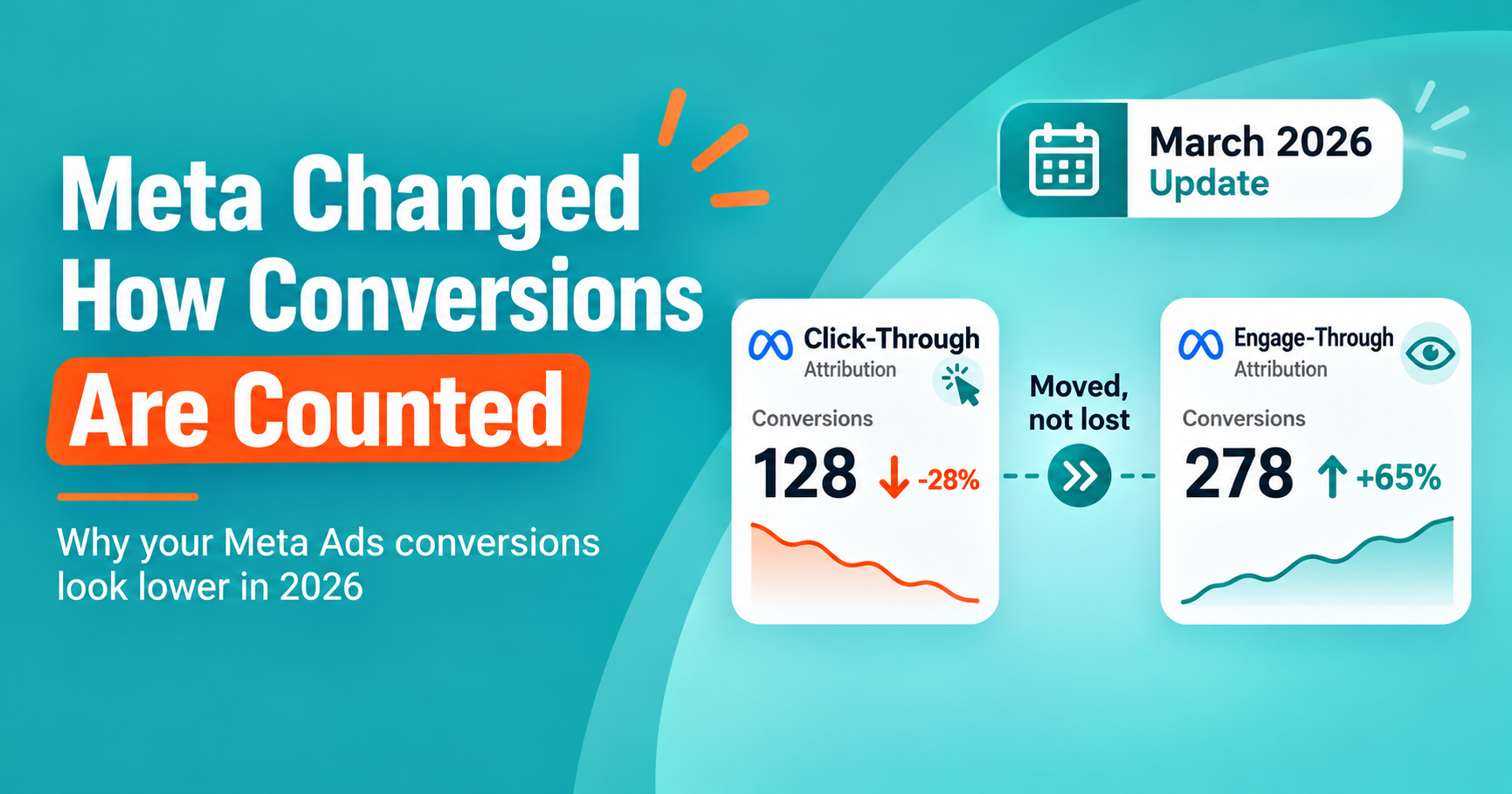
If your Meta ads conversions dropped in 2026, it’s most likely due to Meta’s attribution reclassification introduced in March 2026, which separated click-through conversions from engage-through conversions. Reviewing both metrics together, rather than click-through alone, gives an accurate view of actual campaign performance.
You check your Meta Ads dashboard on a Monday morning and something feels off. The campaigns look the same. The budget hasn’t changed. The creative is still performing the way it always has. But the conversion number is lower than last month, and you can’t explain why.
Meta quietly rebuilt how it counts conversions, and that change is the real reason your numbers look different. This isn’t a bug. It’s a permanent shift in how Meta ads attribution works, and once you understand it, your reports will start making sense again.
This guide breaks down exactly what changed, why Meta made the change, and what to do about it, whether you manage your own account or work with an agency.
What Changed in Meta Ads Attribution in 2026
In March 2026, Meta changed how it classifies conversions for campaigns optimizing toward website or in-store sales. Click-through attribution now only counts a conversion if someone clicked a link in the ad. If a person interacted with the ad in another way, such as liking it, expanding it, or watching part of a video, and later converted, that conversion no longer appears under click-through results. Instead, it moves into a separate category called engage-through attribution.
Before this update, a broader range of interactions could count as a “click,” even if no one actually followed a link to your website. That made click-through numbers look stronger than they really were.
Now, Meta separates the two behaviors:
- Click-through attribution: The person clicked a link in your ad and later converted.
- Engage-through attribution: The person interacted with the ad in some other way and later converted, without clicking a link.
This is a reporting change, not a performance change. Your ads are likely still reaching the same people and driving similar results. What’s different is how those results get labeled in your dashboard.
Why Did My Meta Ads Conversions Drop After This Update
Your Meta ads conversions likely dropped in the report because some conversions that used to count as click-through are now counted separately as engage-through. The total number of people converting hasn’t necessarily changed. The way Meta labels those conversions has.
Here’s a simple way to picture it. Imagine someone scrolls past your ad, watches a few seconds of the video, doesn’t click anything, but visits your website later that day and makes a purchase. Under the old system, that could still get credited as a click-through conversion. Under the new system, it gets sorted into engage-through instead.
If your reporting dashboard or a client report only tracks click-through numbers, this shift can make your campaign look weaker than it is. Business owners who don’t know about the change often assume their ads stopped working, cut their budget, or panic before checking what’s actually happening behind the numbers.
Common Reasons for the Confusion
- Reports built before March 2026 only tracked click-through as “the” conversion metric.
- Automated dashboards and third-party tools hadn’t updated their default views yet.
- Agencies reporting to clients used outdated templates that ignored the new engage-through category.
- Business owners compared this month’s click-through number directly to last year’s, without accounting for the reclassification.
Click-Through vs Engage-Through Attribution: A Side-by-Side Comparison
| Attribution Type | What Counts | What It Tells You |
| Click-through attribution | Person clicked a link in the ad, then converted | Direct response driven by the ad’s call to action |
| Engage-through attribution | Person liked, expanded, or watched the ad, then converted without clicking a link | Interest and brand influence, even without a direct click |
Both numbers matter. Click-through tells you how well your ad drives immediate action. Engage-through tells you how much influence your ad has on people who convert later, through another channel or a direct visit.
Looking at only one number gives you half the picture. Looking at both gives you a more honest view of how your Meta ads campaign actually performs.
How to Read Your Meta Ads Attribution Report Correctly Now
To read your Meta ads attribution report accurately in 2026, check both click-through and engage-through conversions together, rather than judging performance from click-through alone. Compare current combined totals to your pre-March 2026 numbers, and adjust any historical benchmarks you use for reporting.
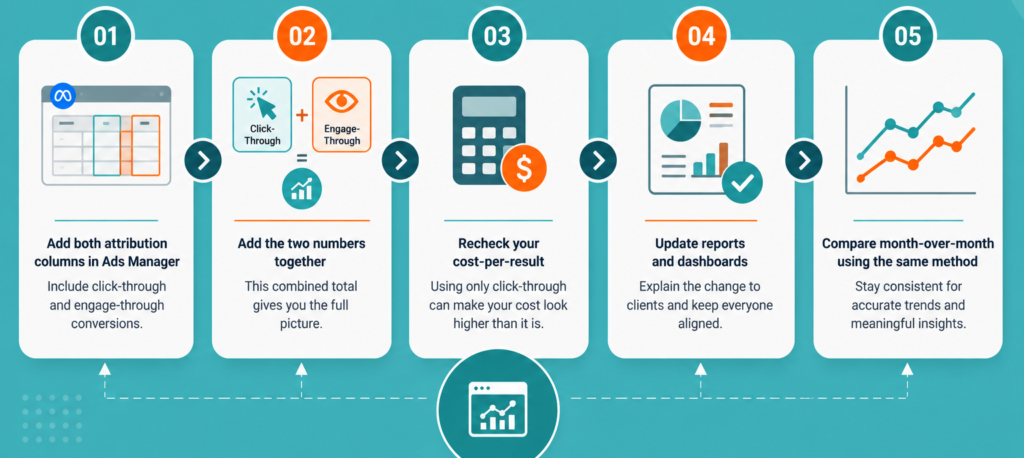
Follow these steps when reviewing your account:
- Open Ads Manager and add both attribution columns. Don’t rely on the default view. Manually add engage-through conversions next to click-through conversions.
- Add the two numbers together for a fuller picture. This combined figure is closer to what your old click-through number used to represent.
- Recheck your cost-per-result calculations. If you’re still dividing spend by click-through conversions alone, your cost-per-result will look artificially high.
- Update any client-facing reports or dashboards. If you manage accounts for clients, explain this change proactively. It builds trust and avoids awkward conversations later.
- Compare month-over-month using the same method. Once you switch to combined reporting, stay consistent so your trend lines stay accurate.
What This Means for Advantage+ Campaigns
Meta has also made Advantage+ the default way most campaigns run, rather than a separate option advertisers choose. Advantage+ relies heavily on Meta’s automated ad delivery systems to decide who sees your ads and when.
This matters here because automated campaigns tend to generate more of the engagement-based interactions that fall under engage-through attribution. If you’re running Advantage+ campaigns, you may notice an even bigger gap between old click-through habits and the new combined reporting approach.
The practical takeaway: if you manage Advantage+ campaigns, get comfortable with Meta Ads management service sooner rather than later. It’s likely to become a bigger share of your reported results over time.
Common Mistakes Businesses Make After This Change
- Assuming the ads stopped working. In most cases, performance hasn’t changed. The reporting has.
- Cutting budget too quickly. Reacting to a lower click-through number without checking engage-through data can lead to pulling back on campaigns that are still performing well.
- Ignoring the change in client reports. If you run ads for clients, silence creates confusion. Explaining the shift early avoids losing trust.
- Comparing new numbers to old benchmarks without adjusting. A fair comparison requires combining both attribution types, not comparing click-through alone across different time periods.
- Not checking the Conversions API setup. If your Meta pixel tracking or Conversions API (CAPI) wasn’t recently reviewed, some conversions may be misreported for reasons unrelated to this attribution change too.
Best Practices Going Forward in Meta Ads
- Review both attribution types every time you check performance, not just once after reading this.
- Set a monthly reminder to audit your Meta ads reporting accuracy, since Meta continues to update measurement systems throughout the year.
- Keep a simple internal note of when major attribution changes happen, so future dips in one metric don’t cause unnecessary panic.
- If you work with an agency, ask them directly how they’re accounting for engage-through attribution in your reports.
- Pair Meta’s own reporting with an independent source, like Google Analytics or your CRM, to confirm actual conversions rather than relying on ad platform numbers alone.
Expert Tip Facebook ads conversion
Don’t treat this as a one-time fix. Meta has changed attribution logic before, and it will likely do so again as AI-driven ad delivery systems like Andromeda and GEM continue to expand. The businesses that adapt fastest are the ones that build a habit of checking both attribution types regularly, rather than trusting a single dashboard number without question.
Key Takeaways Meta click-through attribution
- Meta’s March 2026 update separated click-through and engage-through attribution for website and in-store conversion campaigns.
- A drop in click-through conversions often reflects reclassification, not a real drop in performance.
- Reviewing both attribution types together gives a more accurate picture of your Meta ads results.
- Advantage+ campaigns are more likely to show a bigger shift toward engage-through attribution.
- Updating your reporting process now prevents confusion in future months.
Conclusion
A lower conversion number doesn’t always mean your ads are underperforming. Sometimes it means the way those results get counted has changed, and this is exactly what happened with Meta’s 2026 attribution update.
Once you understand the difference between click-through and engage-through attribution, the numbers stop feeling confusing and start telling a clearer story about how your campaigns are actually performing.
If you’d rather have someone else monitor these changes for you, so you can focus on running your business, that’s where the right support makes a real difference.
Not sure if your Meta ads are actually underperforming, or if your reporting just needs an update? Book a free business growth consultation with Minchow Coders, and we’ll walk through your account together and show you exactly what your numbers mean.
More insights
AI Agents in 2026: What They Are, How They Work, and How Businesses Can Use Them
A chatbot can answer a customer’s question. An automation can move information from one application to another. An AI…

GPT-6 Astra AGI: Is This OpenAI’s AGI Era Moment
OpenAI did something no major AI lab had done before in such blunt terms: it stood in front of…
The Lean Startup Summary: The Complete Breakdown Every Founder Needs
The Lean Startup by Eric Ries teaches entrepreneurs to test business ideas with a Minimum Viable Product instead of writing a long business plan. The lean startup methodology uses a Build-Measure-Learn loop to validate what customers actually want, so founders…
Want results like this for your business?
Book a free consultation and we will show you where to start.
Talk to us on WhatsApp